









Accounts payable plays an important role in every organization. Invoices need to be received, reviewed, approved, and processed accurately and on time. Yet many organizations still rely on manual processes that involve paper invoices, email approvals, spreadsheets, and data entry.
While these processes may have worked in the past, growing organizations often find that manual AP processes become increasingly difficult to manage. Delays, limited visibility, and administrative work can create challenges that affect productivity, cash flow, and employee satisfaction.
Here are five signs your accounts payable process may have outgrown manual work.
1. Invoices Arrive Through Too Many Channels
Many organizations receive invoices through multiple channels, including email, mail, PDFs, vendor portals, and paper documents. Employees often spend time opening emails, printing documents, scanning invoices, and manually entering information into accounting systems.
When invoices arrive in different formats and locations, it becomes difficult to maintain consistency and visibility.
Modern AP solutions can automatically capture invoices from email, scanned documents, and digital files, helping organizations centralize information and reduce manual handling.
2. Employees Spend Too Much Time Chasing Approvals
Approval delays are one of the most common challenges in accounts payable.
Invoices may sit in email inboxes, wait for signatures, or require employees to follow up with managers to determine their status. When approvals are delayed, payments can be delayed as well.
Manual approval processes often create bottlenecks that reduce visibility and make it difficult to know where invoices stand. The result can be late payments, strained vendor relationships, and additional administrative work.
Organizations that automate approval workflows can route invoices to the appropriate individuals and provide greater visibility throughout the process.
3. Your Team Spends More Time Entering Data Than Analyzing It
Finance professionals provide significant value through reporting, analysis, forecasting, and strategic decision-making. However, manual AP processes often require employees to spend large portions of their day entering invoice data, reconciling information, and correcting errors.
Automation allows finance teams to spend less time performing repetitive tasks and more time focusing on analysis, insights, and business planning. Organizations can improve productivity while allowing employees to contribute in higher-value ways.
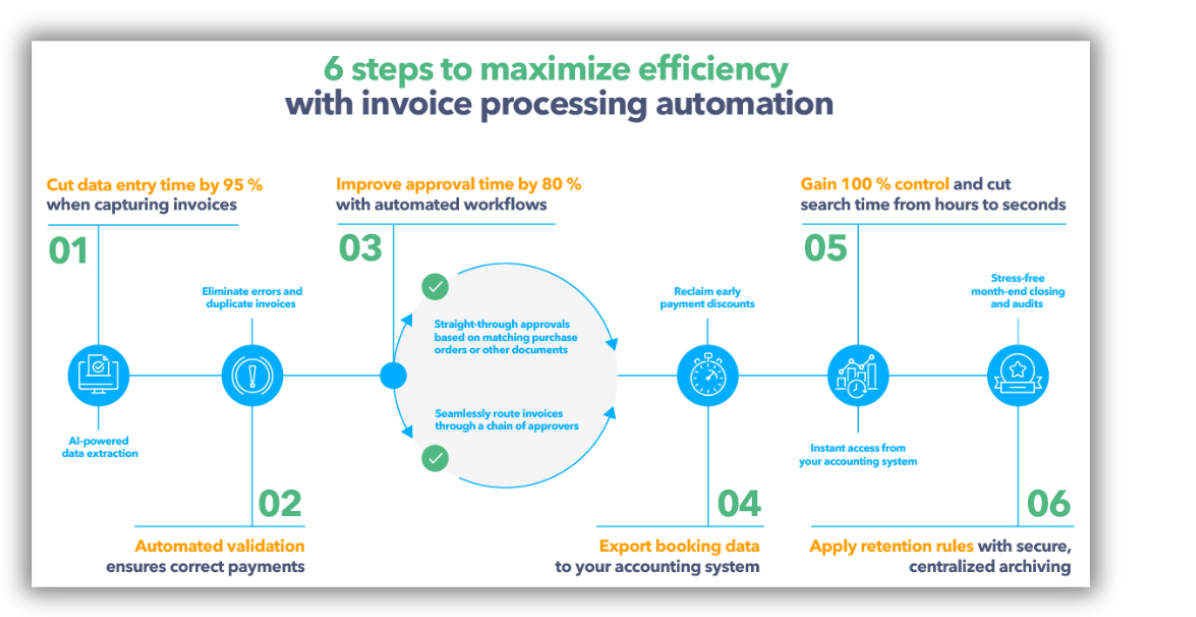
While every organization’s AP process is different, modern automation technologies can improve efficiency, reduce errors, and accelerate approvals. This DocuWare infographic illustrates how invoice processing automation improves efficiency, accuracy, and visibility.
4. You Lack Visibility Into Invoice Status
A common question in many organizations is, “Where is that invoice?”
When documents are stored in filing cabinets, shared drives, email folders, or multiple systems, finding information can become difficult. Employees may spend valuable time searching for invoices, verifying approvals, or determining whether payments have been processed.
Limited visibility can also make it difficult for managers to understand outstanding liabilities, monitor workloads, or identify bottlenecks.
Automated workflows provide greater transparency by allowing organizations to track invoices throughout the entire process. Search capabilities, audit trails, and reporting tools help teams quickly locate information when needed.
5. Errors, Exceptions, and Rework Are Becoming More Common
As invoice volumes increase, manual processes often lead to more errors, duplicate work, and exceptions. Incorrect data entry, misplaced documents, missing approvals, and inconsistent processes can create additional work for finance teams.
Manual processes also introduce risk through compliance gaps, late fees, and document management challenges. The webinar materials highlight how errors, rework, and paper-based processes contribute to additional costs and operational risk.
Automated validation, matching, routing, and exception handling can help organizations improve accuracy while reducing administrative burden.
Moving Beyond Manual AP Processes
Modern accounts payable automation is not simply about processing invoices faster. It is about improving visibility, reducing risk, increasing efficiency, and allowing finance teams to focus on more strategic work.
Organizations that evaluate their current AP processes often discover opportunities to reduce manual work, improve collaboration, and gain better insight into their financial operations.
If your organization is experiencing any of these challenges, it may be time to evaluate whether your accounts payable process has outgrown manual work.
See AP Automation in Action
Join KDI and DocuWare on July 14th at 10am EST for a webinar exploring how organizations are using AP automation to reduce costs, improve visibility, and increase productivity through modern workflows. During this session, you’ll learn how organizations are reducing manual work, improving invoice visibility, and allowing finance teams to focus on higher-value activities.
Frequently Asked Questions About AP Automation
What is accounts payable automation?
Accounts payable automation uses software and workflows to capture invoices, route approvals, match purchase orders, and process invoices electronically.
How do I know if my AP process needs automation?
Organizations often begin exploring AP automation when invoice volumes increase, approvals take too long, documents are difficult to find, or employees spend excessive time entering data manually.
Can AP automation work with our accounting system?
Many AP automation solutions integrate with ERP and accounting systems, allowing invoice information to flow between systems while reducing manual entry.
What processes can be automated?
Organizations commonly automate:
– Invoice capture
Data extraction
Approval workflows
Purchase order matching
Exception handling
Document storage and retrieval
Does AP automation eliminate jobs?
No. Many organizations use automation to reduce repetitive administrative work so finance teams can focus on reporting, analysis, forecasting, and other higher-value activities.
